
Chrome Extension for Design + Dev Teams
Turn any live website into clear design tokens and shareable audits.
Extract design tokens, review accessibility and drift, and export outputs your team can use immediately in code, design tools, and audit reviews.
Step 01
Scan
Capture styles from real pages and turn them into usable tokens.
Step 02
Review
Inspect tokens, check contrast, and catch accessibility issues.
Step 03
Export
Ship to code, design tools, or share a polished audit report.
Read the docs See how it works
Export output
tokens.css1.8 KBtokens.json4.2 KBfigma-tokens.json6.1 KB
Live scan
WCAG
- AA issues found7 nodes
- Drift detected12 spots
- Report exportedjust now
Chrome Web Store
Free install · no account needed
Inspect, compare, export
One workflow from scan to handoff
Design + Dev teams
Shared token language for handoff
How It Works
From live page to token-ready output in one flow
Scan the page
Open Palext on any live website to capture colors, type, spacing, and UI structure.
Review what matters
Use inspect, layout, accessibility, and snapshot tools to understand what is changing.
Export or report
Send the result into code, design tokens, or a polished audit report for the team.
Why Teams Pick Palext
Core capabilities that move audits from guesswork to action
01
Capture
Inspect + Tokens
02
Review
Contrast + Drift
03
Deliver
Export + Reports
Feature 1
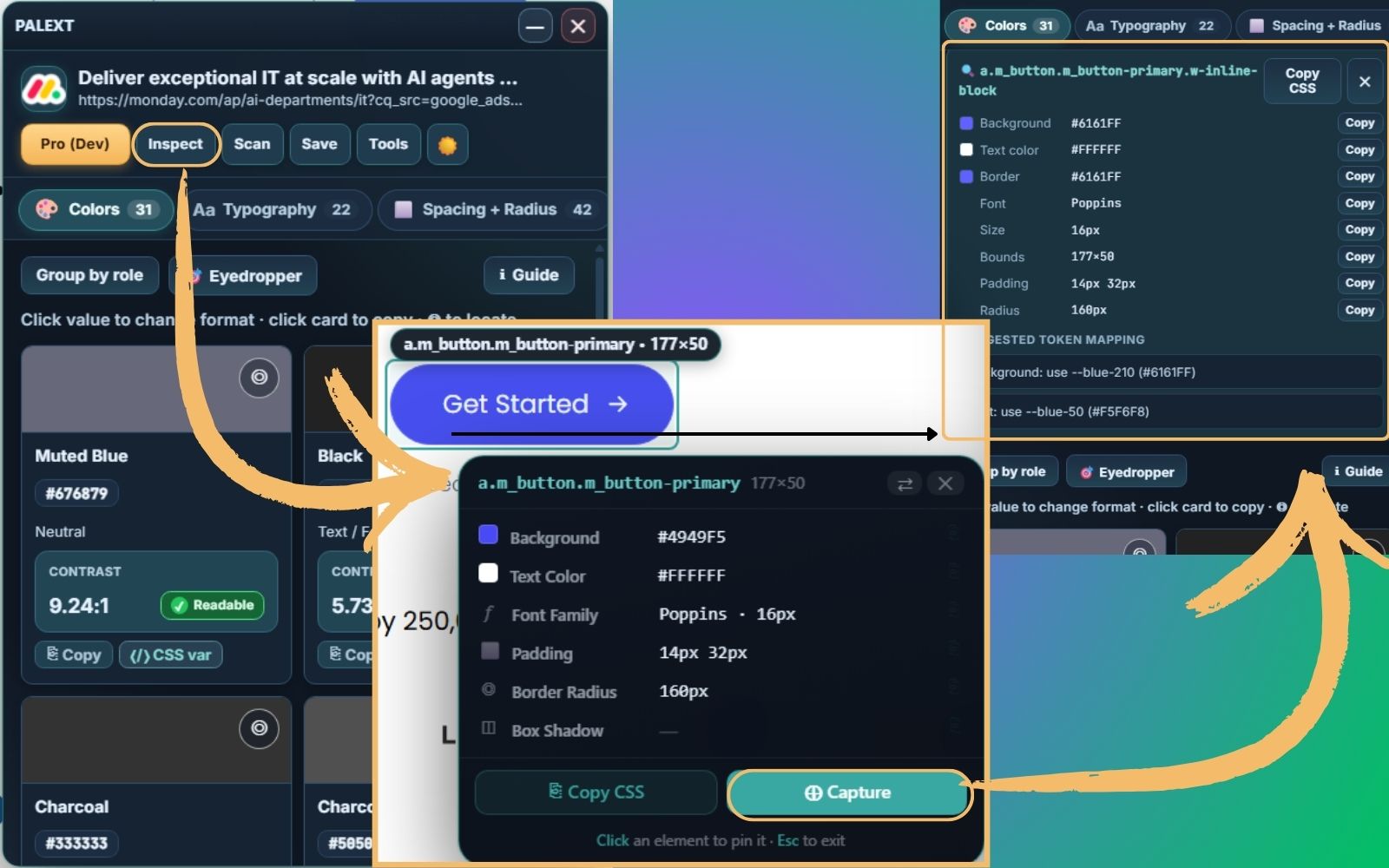
Inspect and token capture on live UI
Move from visual guessing to exact values using computed style extraction and point-and-click inspection.
- Computed colors, type, spacing, radius, shadow, and gradientsFree
- Element inspect mode for immediate value lookupFree
- Locate color and typography instances on pagePro
Feature 2
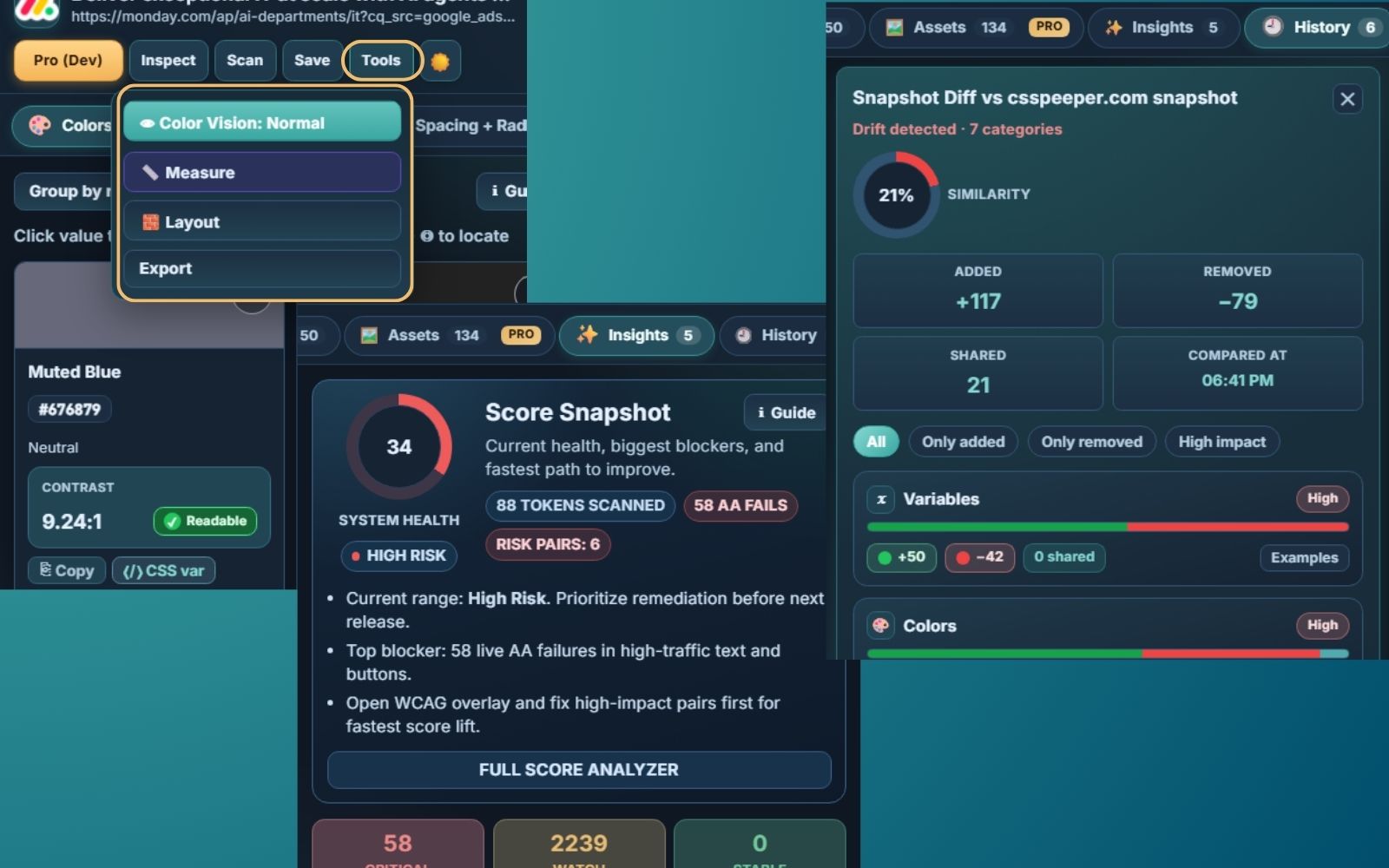
Accessibility and drift review in one place
Identify contrast risk, compare changes, and focus on issues that matter before handoff.
- Color blindness preview and quick contrast visibility checksFree
- Snapshot history and drift compare workflowsPro
- Insights analyzer with recommendationsPro
Feature 3
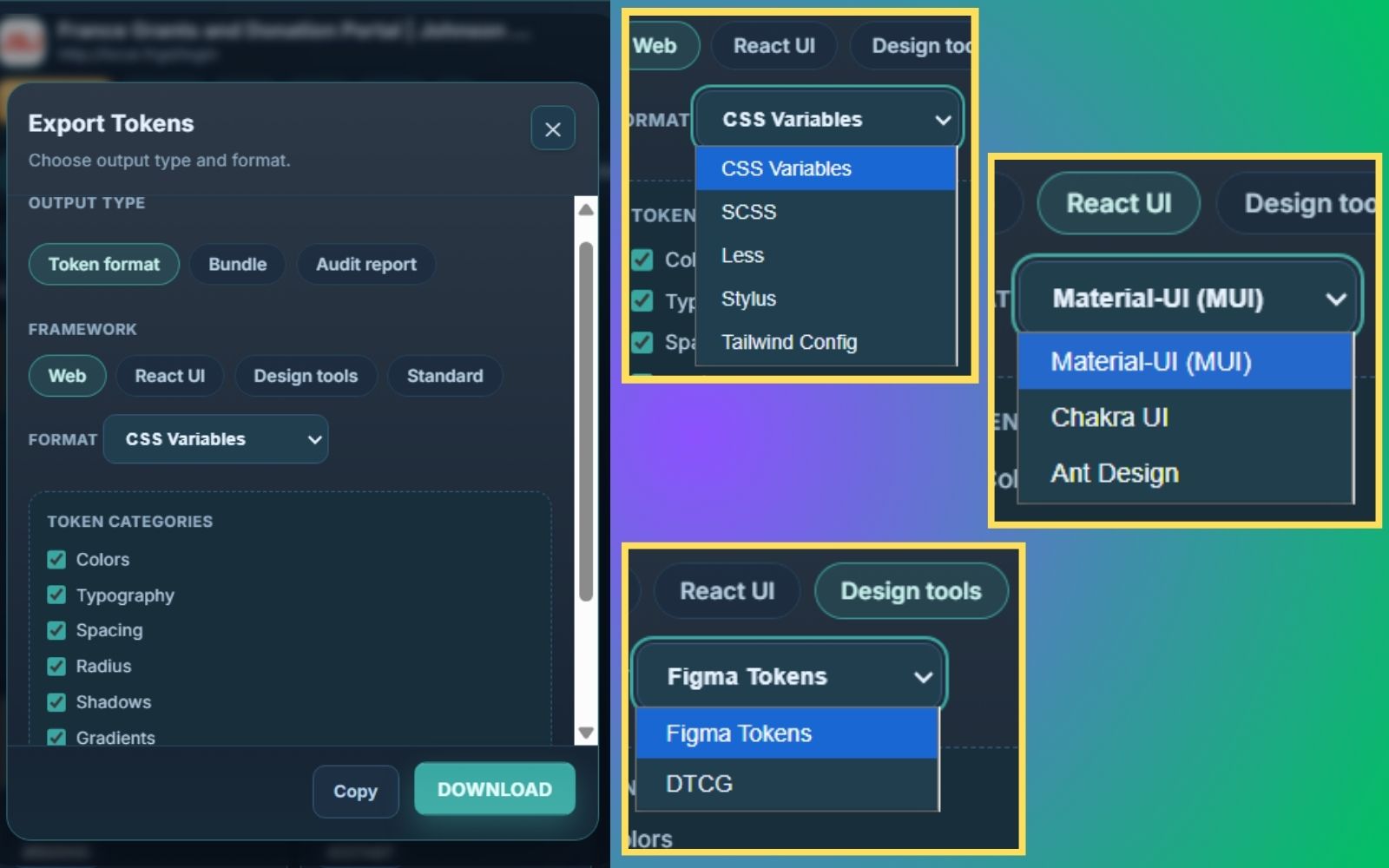
Export-ready outputs for dev and design workflows
Start with core formats in Free, then scale to framework and design-system exports in Pro.
- Core exports: CSS variables, SCSS, JSONFree
- Advanced formats: JS, TS, Less, Stylus, TailwindPro
- React UI plus Figma Tokens and DTCG
Snapshot intelligence for team handoff
Track what changed between scans and keep a reusable history baseline.
Delivery layer with reports and automation
Generate markdown and visual HTML reports and unlock Smart Apply workflows.
Pricing
Simple, transparent pricing
Annual saves 17%
Free Explorer
$0 forever
Built for evaluation and light use.
- Up to 10 scans per month
- Up to 3 snapshots
- Core exports: CSS, SCSS, JSON
- Basic inspect + Layout tool
- Color blindness preview toggle
Pro Builder
$4.99 / month
Best for solo designers and developers shipping regularly. Billed monthly.
- Unlimited scans and snapshots
- Full export formats + React UI family
- Visual HTML + Markdown audit reports
- Measure + WCAG overlays + theme personalization
- History power tools and Smart Apply (Beta)
Secure checkout for Pro is powered by Lemon Squeezy. Payment details are processed by Lemon Squeezy and are never stored by Palext.
Compare
Primary Free vs Pro comparison
Category
Free
Pro
Best for
Light checks and exploration
Production audits and handoff
Audit depth
Basic extraction + inspect
Full analyzer + recommendations
Export depth
Core formats only
All formats + framework families
Report readiness
Manual notes
Structured markdown + visual report
Monthly cost
$0
$4.99
Annual cost
Not applicable
$50/year
Need implementation details? Visit the full feature matrix in docs.
What teams say
Trusted by designers and engineers
Palext cuts my token audit time in half. I used to spend a full afternoon mapping colors manually — now it’s done before my coffee gets cold.
The CSS variable export is exactly what I needed. I scan any client site and have a production-ready token file ready for code review in minutes.
Finally a tool that speaks both designer and developer. The WCAG contrast overlay alone saved us from shipping three accessibility regressions last sprint.
I run accessibility audits for agencies. Palext’s drift detection caught hardcoded values my team had missed for months. The reports are stakeholder-ready out of the box.
The Figma Tokens export is seamless. I scan, export, and sync — no manual token translation ever again. It’s become a permanent part of my handoff workflow.
We integrated Palext into our design review process. Snapshot comparison caught a color regression two days before launch that would have definitely gone live unnoticed.
FAQ
Questions teams ask before rollout
What is included in Free?
Free is for evaluation and light usage: up to 10 scans per month, 3 snapshots, core exports, inspect mode, layout tools, and color blindness preview.
What does Pro unlock?
Pro removes scan and snapshot limits and adds the full export family, audit reports, insights, theme personalization, Smart Apply beta, and production workflow utilities.
Is the $50 price monthly or yearly?
The annual option is $50 per year. The pricing card can also show a monthly view for comparison.
Is Palext only for designers?
No. It is built for both designers and developers with shared language and actionable export outputs.
Can we use it for accessibility triage?
Yes. Palext highlights contrast risk, live AA failures, and provides clear fix-focused sections in reports.
Documentation
Clear guides, zero fluff.
Read step-by-step feature docs whenever you need implementation details.